+1 (409) 800-6601
 contact@virtualbuildingstudio.com
Most MEP clash problems don't start in the ceiling. They start when a team works from a model that's already a week old. A duct gets rerouted on Tuesday, and Thursday's clash report still shows the old path. Then a crew installs against bad information. FMI and PlanGrid’s survey of construction leaders found that poor project data and miscommunication is the reason for 48% of rework on US projects. FMI assigned that cost to $31.3 billion for the year 2018.
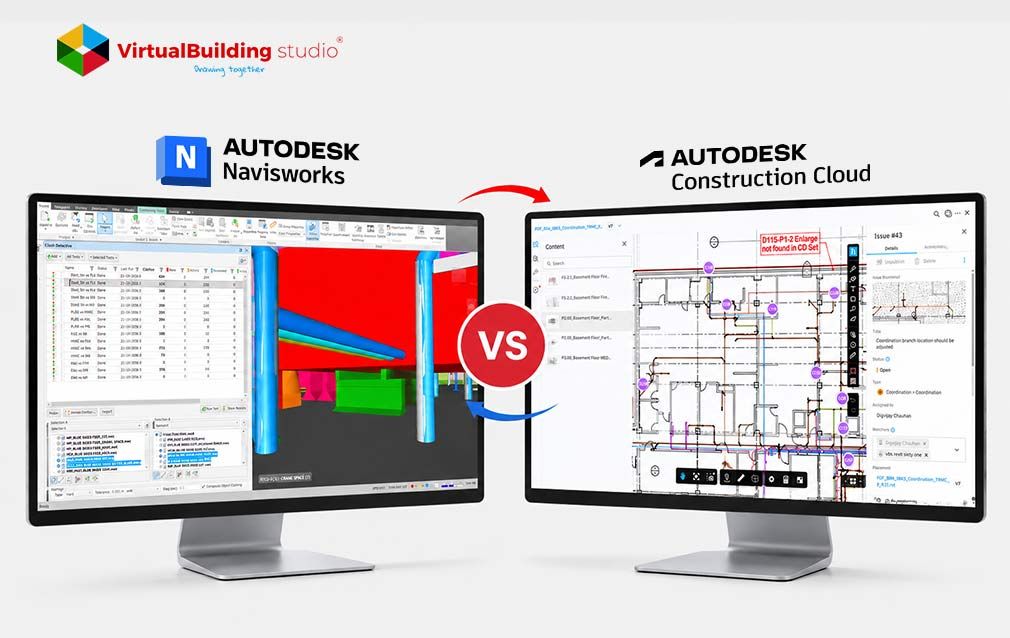
Choosing the tool for clash detection is important but the speed at which clashes are shared is equally important. That speed question lies at the heart of the Navisworks versus ACC clash detection discussion. Navisworks Manage places the desktop in the coordinator’s hands. ACC allows everyone to see clash results, in a web browser. Most teams want both solutions. The real skill is determining which job belongs to which tool.
Understanding Navisworks Manage and Autodesk Construction Cloud
Both are Autodesk products that help teams find clashes before crews do. They are based on two different views on where the coordination should be. Navisworks was born on the desktop. ACC was born in the cloud.
If your team has ever weighed BIM 360 model coordination vs Navisworks, you already know this debate. BIM 360 Design was succeeded by BIM Collaborate Pro, which includes ACC’s Model Coordination. Autodesk has also changed the names of several cloud offerings and is using the Autodesk Forma name more and more for parts of the platform. So some of the screens your team views now might say Forma.
How Desktop Coordination Used to Work
For years, coordination followed a strict weekly loop. A BIM coordinator would:
- Request fresh models from every trade
- Download and append them in Navisworks
- Run the saved clash tests
- Export a PDF or HTML report for the meeting
That loop was all-consuming, but the report didn’t age well. modeling was ongoing with the coordinator compiling. So the meeting went over the building from last week.
How Cloud-Based BIM Coordination Changed the Timing
That delay was resolved using Cloud Based BIM Coordination. Models are uploaded to a Common Data Environment, which acts as a cloud-based hub for all project data. With ACC every reviewer can access the model and view clashes in one central location.
Designers notice the change Instantly. In a mechanical BIM modeling workflow, engineers are able to identify plumbing changes before the weekly meeting. Teams fix issues in days instead of weeks. At this pace it’s only natural to ask: what does Navisworks still do better?
How Clash Detection Works in Navisworks Manage
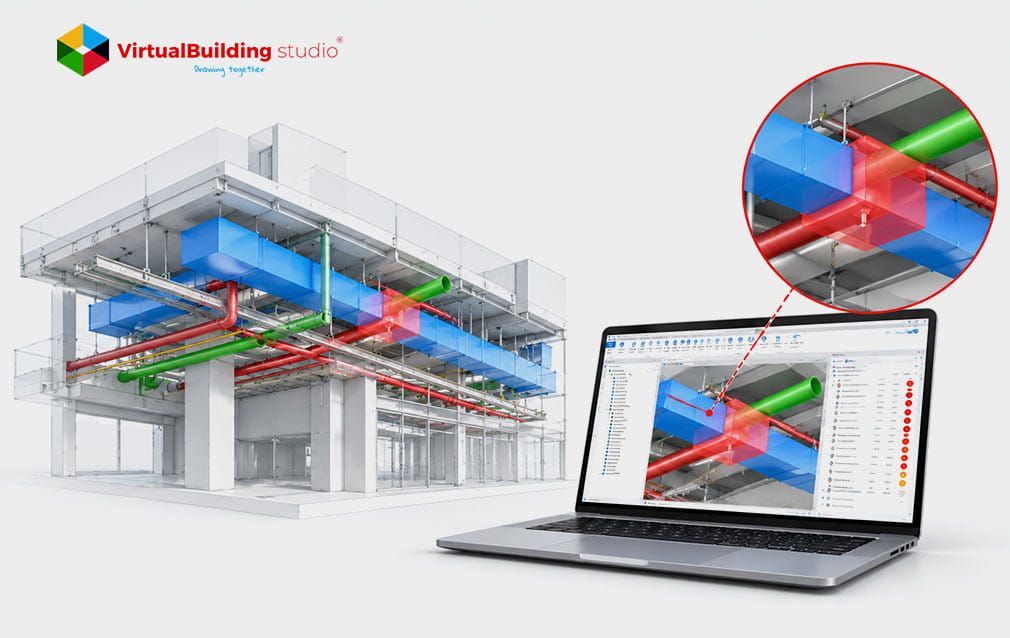
The desktop loop from the last section survives because Navisworks gives coordinators control that browser tools can't match. Coordinators run clashes inside a tool called Clash Detective. They decide exactly which elements get tested against which, and under what rules.
That control comes from search sets. A search set works like a saved filter, such as all pipes on the chilled water system. When the model updates, coordinators don't rebuild anything, because the filter picks up new pipes. Coordinators then pick a clash type for each test:
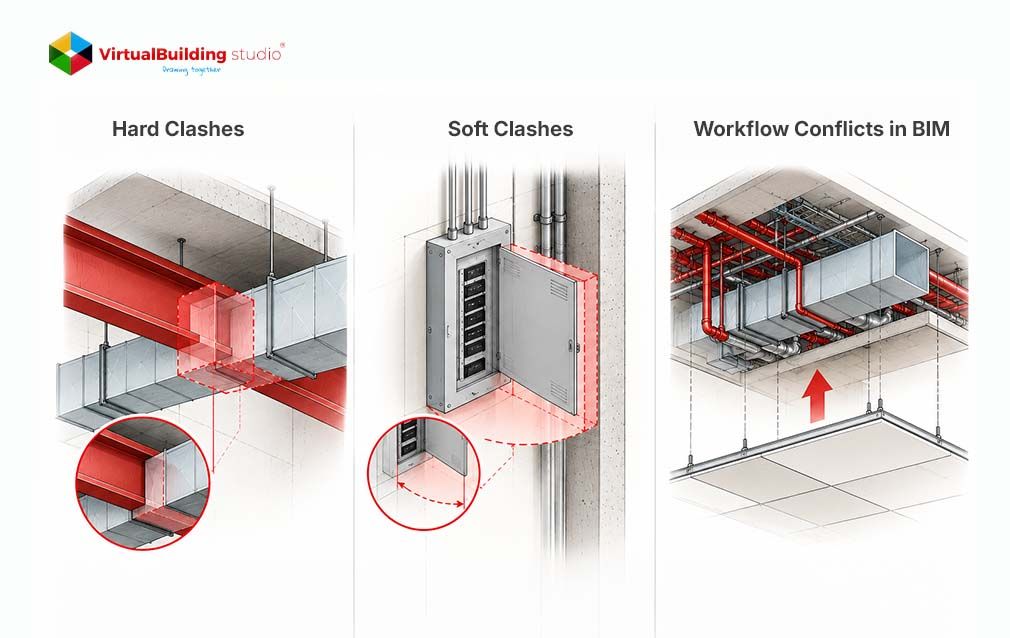
- Hard: two objects physically overlap
- Clearance: an object intrudes on a required gap, like maintenance space
- Duplicates: the same object appears twice
Where Navisworks Pulls Ahead
That rule-based setup pays off most on heavy, detailed projects. Navisworks gives coordinators:
- Room for multi-gigabyte models, fabrication parts, and point cloud scans
- Tolerance controls that skip clashes within one file or by material
- Grouping tools that bundle hundreds of related pipe hits into one item
- XML exports that feed dashboards like Power BI
Firms offering clash detection services lean on these controls to cut noise before reports reach the field.
Where Navisworks Holds Teams Back
That depth comes with real costs. Navisworks requires powerful Windows workstation, and someone has to own the file exchange. If that coordinator is slow publishing, the entire team is looking at stale models. To resolve a clash, you also need to jump into Revit and find the element by ID. Project teams felt those gaps, and that’s why so many migrated to ACC.
How ACC Model Coordination Supports Clash Detection and Issue Management
The coordinator has to set each test up in the Navisworks. On the hand ACC requires almost no setup. The designer just publishes a Revit, DWG, IFC or NWC model in the coordination folder. After the processing is done, ACC enables each reviewer to open new clash results directly in a web browser.
Reviewers view these results in a clash matrix. It’s a grid that works like a heat map. When cells are busy authorized users can click on them to open the clash in a 3D web viewer. From there the user can create an issue. Assign it to the correct designer.
What ACC Does Well
That low setup explains why non-specialists use it. ACC gives project teams:
- Browser access with no software install for field reviewers
- Automatic clash grouping by system or object
- Issues tied to Revit element IDs, visible through the Revit Issues Add-in
The last point matters most. A designer opens Revit and finds the issue pinned to the exact element. Superintendents and project managers can join cloud clash detection workflows without ever learning Navisworks.
Where ACC Falls Short
That simplicity has a price. ACC now lets teams set tolerance, adjust grouping and save clash settings. It still can't match multi-rule search sets, so coordinators see more noise in dense mechanical rooms.
File support is the bigger catch. Autodesk's supported files list limits automatic clash detection to:
- RVT and 3D DWG files
- NWC files exported from Revit or AutoCAD-based apps
- IFC files from a named list of authoring tools
Point clouds work differently. ACC Model Coordination lets teams view and aggregate RCS point clouds alongside design models. It still can’t run automatic clash detection against them, and other NWC or IFC files load for viewing only. Renovation teams and mixed-software subcontractors feel that limit first. On those jobs, outside MEP coordination services can run the Navisworks side while your ACC workflow keeps moving.
Navisworks Manage vs. ACC: Key Workflow Differences
Those strengths and gaps highlight a difference: intent, versus automation. With Navisworks you choose what to test before you even see a clash. With ACC you can publish everything at once. Then go through all the results together.
Both paths cost time, just at different points:
- Navisworks: more setup upfront, cleaner results later
- ACC: almost no setup, more filtering afterward
That's why the Navisworks vs ACC clash detection decision follows the project phase. ACC fits early design checks, like spotting a main duct running through a beam. Navisworks fits prefabrication, where installers can't absorb a quarter-inch miss.
Teams who compared BIM 360 model coordination vs Navisworks years ago found the same split. You'll see that split again in how each tool reports what it finds.
Comparing Clash Testing, Reporting, and Issue Tracking
Finding a clash is half the job. Getting someone to fix it is the other half. In the past Navisworks gave teams a report with screenshots and element IDs. If you didn’t have Navisworks you had nothing to go on. At the meeting coordinators checked the fixes by hand.
The ACC replaces that report with issue tracking. Teams log each issue in a database. They assign a status, an owner and a due date. Everyone works from the list. The project has a history. That kind of ownership is a must, for a MEP coordination process. It doesn’t matter which tool finds the clash.
Here's how the two stack up in a quick AEC coordination platform comparison:
Prices come from CDW reseller listings in October 2026. Your quote may differ.
Neither column wins every row, and that's exactly why so many teams combine them.
How to Build a Combined Navisworks and ACC Clash Workflow
Since each tool wins different rows of that table, experienced teams run both. Autodesk built the bridge for this with the Navisworks Coordination Issues Add-in. The add-in lets coordinators open ACC models in Navisworks and turn Clash Detective results into ACC issues.
A typical hybrid setup runs in five steps:
- Revit users publish models to the ACC coordination space.
- Project managers use ACC's automatic matrix for early checks and broad reviews.
- The BIM manager opens those same cloud models in Navisworks through the add-in.
- The BIM manager runs search set and clearance tests in Clash Detective.
- The BIM manager turns grouped clashes into ACC issues for the right designers.
When a designer updates an issue's status, the matching clash result in Navisworks updates too. With this setup, teams add Navisworks precision to cloud clash detection workflows. Nobody downloads and appends files by hand anymore.
Best Practices for MEP BIM Coordination and Clash Resolution
A hybrid setup only pays off when the team agrees on what gets coordinated first. Coordinators use software to find clashes, but the team decides which ones get fixed first. Most experienced coordinators lock the least flexible systems first and route flexible ones around them:
- Gravity drainage, since slope fixes its path
- Main HVAC ductwork, since it takes the most space
- Pressure piping
- Electrical conduit, which bends most easily
Clean inputs matter just as much for Cloud-Based BIM Coordination. Designers should set up dedicated publishing views in Revit before models reach ACC. Those views should strip out:
- 2D annotations
- Furniture, trees, and site elements
- Any geometry the trades don't need to check
Teams that publish lighter models get faster load times and fewer false clashes.
Choosing the Right Clash Workflow for Your Construction Project
Even though you already have habits you still have to pick which tool will lead your project. The choice of tool depends on how complex the project's how mature the team is. Try running your comparison of AEC coordination platforms using the two lists below.
When ACC Alone Is Enough
ACC Model Coordination can carry the load when:
- The project is a standard commercial build under about 100,000 sq ft
- Most consultants model in Revit
- Your goal is quick issue spotting without a full-time VDC coordinator
When Navisworks Manage Is Non-Negotiable
Navisworks becomes a must when:
- You are building hospitals, data centers, or industrial plants where there are space requirements
- You are looking at fabrication spools and matching them with point cloud scans
- Subcontractors who are creating models in Plant 3D, Tekla, or CADmep
Most real projects land somewhere between those two lists. Multi-story residential work shows how disciplined clash cycles play out floor by floor.
Whichever path fits your job, one lesson ties both tools together.
Conclusion
Navisworks versus ACC clash detection has never been a fight. Navisworks gives coordinators the precision needed for fabrication while ACC gives the team a list of open issues. Teams that use ACC for access and tracking and use Navisworks for tolerance work catch problems before crews do. That pairing helps reduce rework caused by outdated models, coordination gaps, and unresolved clashes. So choose the tool that fits your system first then build a bridge, between Navisworks and ACC.

Every clash missed in the model costs your crew on site, so let’s build a workflow that catches it first