+1 (409) 800-6601
 contact@virtualbuildingstudio.com
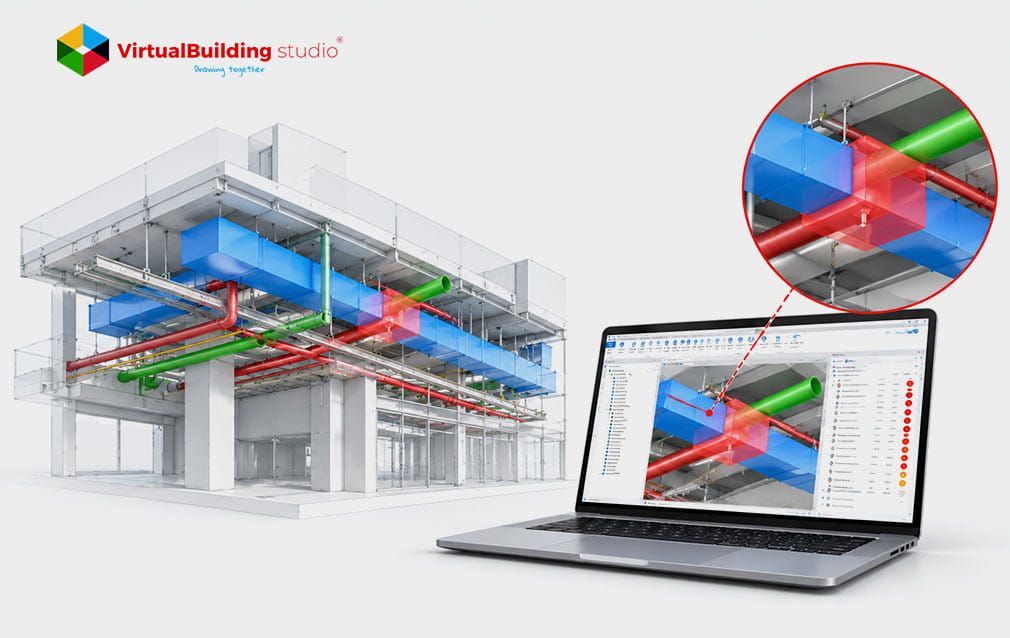
Most clash reports suffer from a sorting problem than a detection problem. One can have thousands of items flagged by one test on a model and every item receives the same label. Afterwards coordinators review those items, in the order in which they first appear. That habit buries the issues that stop a build under warnings nobody needed. The hard vs soft clash BIM split gives teams a way to sort the pile. A third group, workflow conflicts, covers problems that only show up once the schedule is attached. All three groups need clear definitions before anyone starts triaging.
Deconstructing the Three Main Categories of BIM Clashes
In a model of coordination, each system has its path and each path has space around it. A federated model brings all disciplines together into a file. Testing everything against everything creates a lot of noise. Teams cut through that noise by asking what kind of problem each clash is. The types of clashes in BIM fall into three groups:
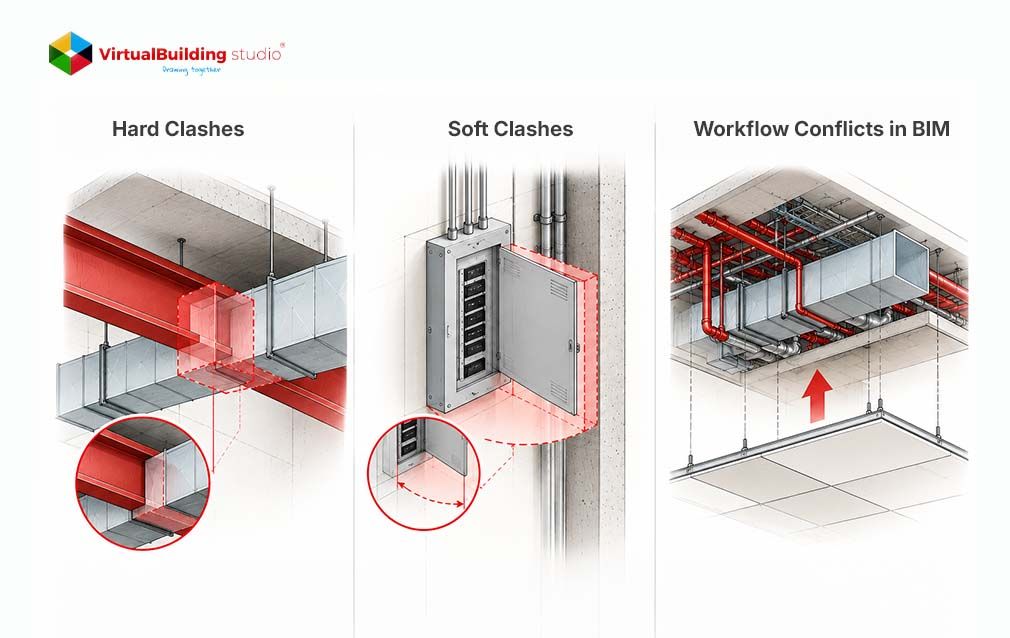
- Hard clashes (Geometric): Two objects are occupying the same space, like a pipe going through a steel beam.
- Soft clashes (Operational): Nothing touches, but a required buffer is violated, like a missing insulation envelope.
- Workflow conflicts (Temporal): The model is clean, but the order of installation makes the work impossible.
Each group needs its test and its own owner and its own sense of urgency. That is the essence of a Good BIM Workflow Process. Hard clashes are the easiest to picture so they are first.
Hard Clashes (Direct Geometric Intersections)
The first group is the easiest to picture because normal coordination means every system keeps to its own space. A hard clash breaks that rule when two elements occupy the same coordinates. Coordinators see it as two 3D shapes passing through each other. Two forms cause most of the trouble on MEP jobs.
Pipe Mains Cutting Through Steel Beams
Developing this form is easy because pipe mains and structural steel are located in the ceiling zones. A chilled water main that crosses a wide-flange beam web needs an opening that is approved by the engineer. Without that opening, the fabricator cannot install the pipe as it is modeled. The route changes, or the engineer signs off, on a penetration. Ductwork and sloped drain lines also collide. The duct must move because the drain pitch cannot be altered.
Conduits Meeting Shear Walls Without Sleeves
Walls cause the same trouble. Shear walls carry load, so every opening in them is planned ahead. Electrical conduit racks that cross a shear wall with no modeled sleeve create a hard clash. The electrical team then has to ask the structural engineer for a new penetration.
What a Hard Clash Costs
Both examples get more expensive once concrete cures and trades start working. Fixing a hard clash in the model means a coordinator changes an elevation or adds an offset, which takes minutes. Fixing it on site can mean core drilling, tearing out installed material and stopping neighboring trades.
The broader cost of rework shows how much that gap matters. . A study of 19,605 rework events across 346 projects showed thatrework reduced one contractor’s mean yearly profit by 28%. Clashes are only one reason for rework, but they are the reason a team can spot on a screen.
Hard clashes are caught when the fix still costs minutes with Strong BIM Coordination services. Teams with MEP BIM Services support model the sleeves and offsets before drawings go out. Hard clashes are loud, though. The quieter group can hide inside a model that shows zero of them.
Soft Clashes (Clearance, Buffer, and Maintenance Violations)
A model with zero hard clashes can still fail on site, because a hard test never checks for working room. Normal installation leaves space around every system for insulation, supports and human hands. A soft clash happens when an element enters that space without touching anything. No clash does not mean enough space. Clearance clash detection is the test that finds these violations, and three causes come up again and again.
Missing Insulation Envelopes
Insulation creates more soft clashes than anything else. The model and the field disagree on pipe size. Many models route pipes at bare size. A chilled water pipe clears a duct on screen. That gap is then filled in the field with two inches of fiberglass and a vapor barrier. Modeling the insulated outer size from the start prevents it. Bare-size routing also leaves no space for couplings, supports or a pipefitter's wrench.
Code-Required Access Zones
Codes reserve space that no other system can use. The NEC requires space in front of switchboards and panels as stated in rule 110.26. For equipment rated up to 600 volts, the space must be 30 inches wide and 6.5 feet high. The space must be even wider, for large units. The depth of the space will vary from 3 to 4 feet depending on voltage and conditions at the site. If a sprinkler pipe runs through that space, it can fail inspection & Require rework.
Equipment Maintenance Pull Spaces
The same logic applies to mechanical rooms, except the people who need the space show up years after construction. Facility staff need room to service the contractor’s work. Chillers need a clear lane to pull tubes. Air handling units (AHUs) need space for filter racks to slide out. Valves need turning room. A column, cable tray or pipe rack in that lane means nobody can service the chiller without removing permanent work.
The fix is a transparent keep-out box attached to the equipment family in Revit. Coordinators then test against the box, so the reserved space is protected like any physical object. A pipe that enters the box shows up in the report on day one, long before anyone orders material. Many MEP BIM Services teams build these boxes into their equipment families as standard practice.
Space is only two of the three dimensions that matter. The schedule adds the third.
Workflow and 4D Temporal Clashes (Constructability Sequencing)
Soft clashes check space but space changes as a project moves forward. A normal build add work in sequence. Each trade needs a way in. Workflow conflicts appear when the schedule blocks in that manner. Teams that test 4D BIM workflow conflicts discover issues that a static model can never reveal.
The coordinators can link the model in Navisworks to a schedule, from Primavera P6 or MS Project. Next the TimeLiner tool plays the build in order so the team can watch each phase land.
Spatial Dead-Ends
A dead-end forms when finished work traps something that has not arrived yet. Take a basement mechanical room where the AHU fits perfectly inside its walls. The model shows zero hard clashes and zero clearance violations. Framing and drywall finish in week 12, but the AHU arrives in week 15. The crew must tear down walls to bring it in. A sequence change fixes it: hoist the equipment first and close the walls later.
Crane Pick-Paths and Staging Areas
Cranes need clear air the same way walls need clear floor. A pick path has to stay open from the laydown area to the final position. That path may be blocked by shoring, scaffolding, formwork or a material yard. Design models usually omit items so that no standard test will find temporary items.
Adding those items to the model gives coordinators something to test against. The team can then spot a blocked pick path week early, not on the morning of the lift. A sound BIM Workflow Process treats temporary works as seriously as permanent ones. BIM Coordination services that include schedule linking also catch these conflicts before the crane is booked.
All three groups depend on how the tests are set up. Poor settings bring the flood of noise right back.
How to Configure Tolerances to Avoid False Positives in Navisworks
A test is only useful if it is built to find its kind of problem. The default test looks at every pair of objects the way so the report ends up full of clutter again. A pipe touches its elbows too and those intentional joins show up as clashes. Coordinators can clean up that noise in two ways.
Clearance Tolerances for Service Envelopes
A hard test waits for objects to touch, while a service envelope needs a warning before they do. Clash Detective in Navisworks offers a Clearance test type, where the tolerance field sets the minimum distance. For an electrical panel, a coordinator can enter 36 inches so anything entering that zone is flagged. Hard tests use the same field to ignore overlaps smaller than the number entered.
Clearance clash detection only works when the envelope exists in the model, so the keep-out boxes from earlier matter here.
Rules for Same-System Clashes
The second source of noise is parts that belong together. Pipes, fittings and hangers in one system touch by design. A coordinator writes a rule or search set that skips pairs from the same Revit system or fabrication spool group. What remains is a shorter list of clashes between different systems, which are the ones that cost money.
Providers of BIM Clash Detection Services apply these settings by default so the report stays readable. Teams interested in seeing the full setup can read about BIM clash detection Navisworks protocols for MEP projects.
Once the tests are clean, there’s still a need for a team to go through what each clash type means so quickly.
Summary Matrix: Root Cause, Detection Method, and Typical Cost Impact
The tolerance settings above match well to the three groups and the table highlights the tolerance settings. Read across a row to see why a clash type needs a fix, for each group. The detection method for 4D BIM workflow conflicts differs most, because it needs a schedule.
Conclusion
A long clash report is a detection win, but the real win is knowing which lines matter. Hard clashes are geometric and stop installation. Soft clashes are operational and surface later as failed inspections. Workflow conflicts are temporal, and only a schedule-linked model exposes them. Once teams can tell these types of clashes in BIM apart, meetings get shorter.
Experienced BIM Clash Detection Services providers set tolerances once, so every report stays actionable. Send us your federated model, and we will show you which clashes can hurt your build.

Send us your federated model, and we will show you which clashes can actually hurt your build.