
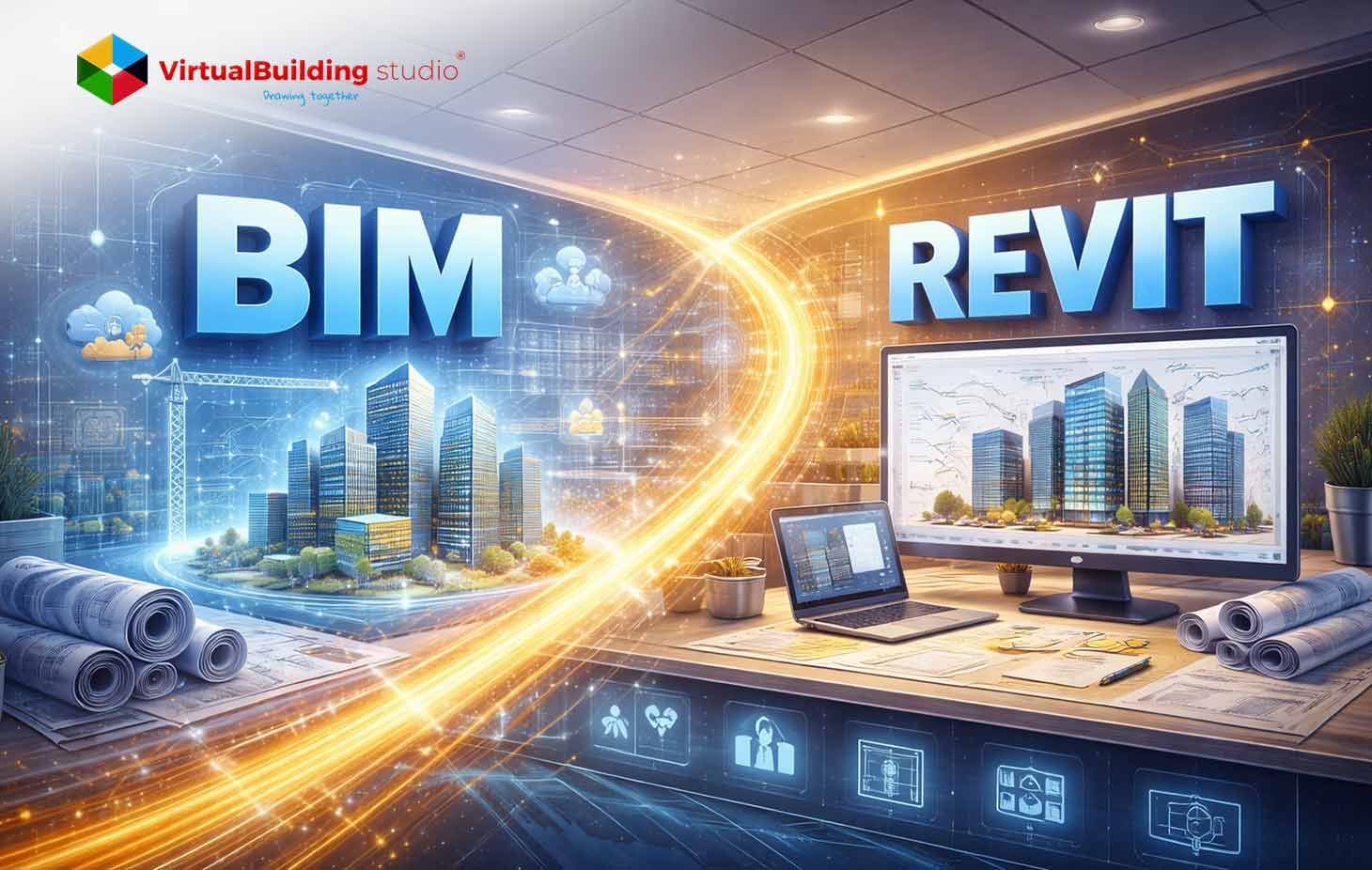
The confusion between BIM vs Revit persists across architecture, engineering, and construction teams. Building Information Modeling vs Revit isn’t a software comparison, it’s a misunderstanding of process versus platform. Teams invest heavily in Revit licenses, migrate entire production pipelines, and still feel like coordination issues, rework, and late-stage surprises haven’t gone away. The assumption is simple. “If we are on Revit, we are doing BIM”.
That assumption is where most problems begin.
Building Information Modeling is not software. It’s a method of working. Revit is a tool that can support that method or quietly undermine it if used without structure. We have seen both outcomes across architectural studios, MEP consultants, and contractor coordination teams. Same software, very different results.
This article breaks down
- The real difference between BIM and Revit
- Explains how BIM Revit software fits into a project workflow
- Outlines where Revit helps, where it doesn’t
- What decision-makers should plan for before scaling
Understanding Building Information Modeling (BIM)
BIM is a collaborative process of creating building information model, managing and exchanging building data across the project lifecycle. Here, the geometry and information matter equally.
A wall in BIM isn’t just a shape. It carries fire rating, material layers, acoustic performance, cost data, and often maintenance intent. That information is expected to stay consistent as the project moves from design to construction and eventually into operations.
ISO 19650 formalizes this approach to information management. Many public and institutional clients now expect compliance, whether explicitly stated or not.
What BIM Actually Covers in Practice
| What BIM Includes | What is Not BIM |
|---|---|
| A defined information management process across design, construction, and handover | A single software tool or file format |
| Clear information requirements (what data is needed, at what stage, and by whom) | Automatically better coordination just by using 3D models |
| Structured 3D models with data (parameters, classifications, properties) | Geometry-only 3D models with no usable data |
| Discipline responsibility and ownership for model elements | Everyone editing everything without accountability |
| Model-based coordination between Architecture, Structure, and MEP | Clash detection as an afterthought at the end of design |
| Common Data Environment (CDE) for controlled sharing and versioning | Email-based file sharing or uncontrolled file servers |
| Standardized naming, classification, and version control | Ad-hoc naming like: Final_v7_Updated_NEW.rvt |
| Defined Levels of Development (LOD) aligned to project milestones | Over-modeling everything at early stages |
| Information exchange standards (IFC, COBie, ISO 19650 workflows) | Vendor-locked, proprietary-only data exchanges |
| Model-based quantities and schedules tied to live geometry | Manually recreated Excel quantities disconnected from design |
| Auditability and traceability of changes and decisions | Verbal agreements or undocumented model edits |
| Construction and handover data suitable for FM use | Models that cannot be used after construction |
| Governance, rules, and enforcement | Assumption-based modeling |
| Defined BIM Execution Plan (BEP) | Figuring out BIM rules mid-project |
| Lifecycle thinking (design → build → operate) | BIM stopping at permit drawings |
We have seen firms produce impressive 3D models while still issuing uncoordinated drawings and manually reconciling quantities. That’s not BIM. That’s 3D drafting with extra steps.
What Is Revit? An Overview
Revit is Autodesk’s building design platform for architectural, structural, and MEP BIM modeling. It’s built around parametric objects, coordinated views, and shared project data.
What makes Revit BIM Modeling valuable is not its ability to produce drawings. It’s the way a single change propagates across plans, sections, schedules, and quantities without manual intervention.
That capability is why Revit became central to BIM adoption in many regions. But Revit does not define BIM.
What Revit is Good At vs. Where Revit is Often Misunderstood
| What Revit is Good At | Where Revit is Often Misunderstood |
|---|---|
| Creating parametric, data-rich building models where changes update across views | Being a replacement for BIM strategy, standards, or governance |
| Keeping plans, sections, elevations, and schedules coordinated automatically | “Fixing” coordination issues without defined workflows |
| Supporting multi-disciplinary modeling (Architecture, Structure, MEP) | Working well without early alignment on grids, levels, and coordinates |
| Reducing manual redrafting after design changes | Eliminating the need for model reviews and audits |
| Eliminating the need for model reviews and audits | Delivering reliable quantities without disciplined modeling |
| Enabling team worksharing (local or cloud) | Solving team communication or accountability problems by itself |
| Managing design development and documentation at scale | Being equally efficient for early free-form concept exploration |
| Supporting clash awareness through linked models | Replacing dedicated clash detection and rule-based coordination tools |
| Maintaining design intent through parametric constraints | Preventing poor modeling habits or over-modeling |
| Integrating with coordination, automation, and cloud platforms | Being a complete, closed ecosystem with no interoperability gaps |
| Supporting repeatable production through templates and standards | Delivering consistent output without training and enforcement |
| Handling complex buildings when models are structured correctly | Performing well on very large models without model segmentation |
| Acting as a single source of truth for design data | Guaranteeing accurate handover data without upfront planning |
| Supporting BIM-based documentation workflows | Automatically delivering BIM just because Revit is used |
Key Differences Between BIM and Revit Software
The cleanest way to separate the two is: BIM is the system and Revit is one tool inside it. And this difference matters when comparing Building Information Modeling vs Revit at an organizational level.
| Aspect | BIM | Revit |
|---|---|---|
| Nature | Process and information methodology | Software platform |
| Scope | Organization-wide, lifecycle-focused | Project-level production |
| Governance | Standards, BEP, ISO 19650 | Templates, families, permissions |
| Interoperability | Open standards like IFC | Native RVT with export options |
| Success depends on | People, rules, discipline | Configuration and training |
We have worked with teams using Archicad, Tekla, and even mixed-tool environments who deliver strong BIM outcomes. We have also seen Revit-only teams struggle because no one defined how information should move.
Role of Revit in the BIM Workflow
Revit plays different roles depending on project stage. Understanding that helps avoid forcing it to do jobs it’s not suited for.
Early Design and Setup
Revit works best once project intent is clear enough to justify structured modeling.
During early concept stages, many teams still sketch or mass in other tools. That’s fine. Problems start when those early shapes are pushed too far before information rules are defined.
Best practice we have seen:
- Lock project coordinates early
- Establish model breakdown by discipline or building zone
- Define what model completeness means at each milestone
Design Development and Coordination
This is where Revit BIM modeling shows measurable value.
Linked discipline models, shared grids, and consistent levels allow conflicts to surface early. Not all clashes are critical, but seeing them while changes are cheap matters.
MEP teams especially benefit here. A duct shift updates sections and schedules instantly. Without that linkage, MEP coordination becomes manual and error-prone.
Documentation and Construction Support
Revit’s strength is consistency, not speed. Drawings, schedules, and quantities reference the same objects. When teams trust the model, documentation errors drop.
That trust only exists when modeling standards are enforced.

How Revit Supports BIM Implementation
Revit supports BIM when it is configured around information, not just geometry.
Parametric Intelligence
Parametric modeling allows changes to propagate across views and schedules. Floor height changes update sections. Equipment swaps update quantities.
This reduces rework, which generates one of the highest hidden costs in documentation-heavy projects.
Coordination Visibility
Revit does not work as a clash detection tool, but it improves clash awareness. Linked models and shared coordinates highlight issues before formal coordination cycles begin.
This is especially relevant for How Revit Supports BIM Implementation, where early visibility shortens issue resolution timelines.
Structured Data Handling
Shared parameters and schedules allow teams to extract usable data for procurement and handover. When asset parameters are filled correctly, the same model supports:
- Quantity takeoffs
- Procurement planning
- Handover documentation
This only works if data requirements are defined upfront. Revit allows it. It doesn’t enforce it.
Features of Revit That Enable BIM
Certain Revit features directly support BIM outcomes when configured well.
Parametric Families
Families are the backbone of information quality. Poorly built families slow projects and corrupt data.
What works in practice:
- Simple geometry
- Clearly named parameters
- Shared parameters aligned to schedules
- Limited nesting
Over-modeling is a common mistake. More detail does not always mean more value.
Worksharing and Permissions
Worksets and cloud worksharing allow multiple users to contribute without overwriting each other’s work. The real benefit is control. Teams can restrict editing rights, manage publishes, and track changes over time.
Schedules as Live Data Views
Schedules are not reports created at the end. They’re live views of the model. When teams rely on schedules early, modeling errors surface faster. Missing data becomes obvious.
Automation and Scripting
Tools like Dynamo allow teams to automate repetitive tasks:
- Parameter population
- Model audits
- Batch exports
These may not seem impressive at first. But they improve productivity over time.
Benefits of Using Revit for BIM Projects
When Revit is used within a defined BIM framework, its benefits show up in coordination reliability, change control, and delivery predictability. These gains don’t come from the software alone. They emerge when modeling discipline and information expectations are aligned.
Earlier Coordination, Lower Downstream Risk
One of the strongest advantages of Revit BIM modeling is how early coordination issues surface. Linked architectural, structural, and MEP BIM modeling files make spatial conflicts visible while design decisions are still flexible. Resolving issues at this stage costs hours, not days, and materially reduces late-stage disruption.
Less Hidden Rework During Change
Revit’s parametric relationships reduce the quiet rework that often erodes project margins. When a core dimension changes, associated elements and schedules update together. Teams spend less time chasing drawing mismatches and more time resolving real design problems.
More Dependable Quantities and Schedules
Model-based schedules support earlier and more reliable cost checks when elements are modeled consistently. This improves option evaluation and coordination with cost consultants. The limitation is clear: Revit enables accurate data, but modeling discipline determines its reliability.
Clearer Ownership Across Disciplines
Discipline-specific models and controlled worksharing make responsibility visible. This clarity strengthens BIM Coordination Services by shortening issue resolution cycles and reducing coordination ambiguity.
Documentation Stability Under Change
For teams using Revit for architecture, the biggest benefit is consistency. As designs evolve, plans, sections, and schedules stay synchronized, reducing late-stage cleanup and review churn.
BIM Collaboration Using Revit and Cloud Platforms
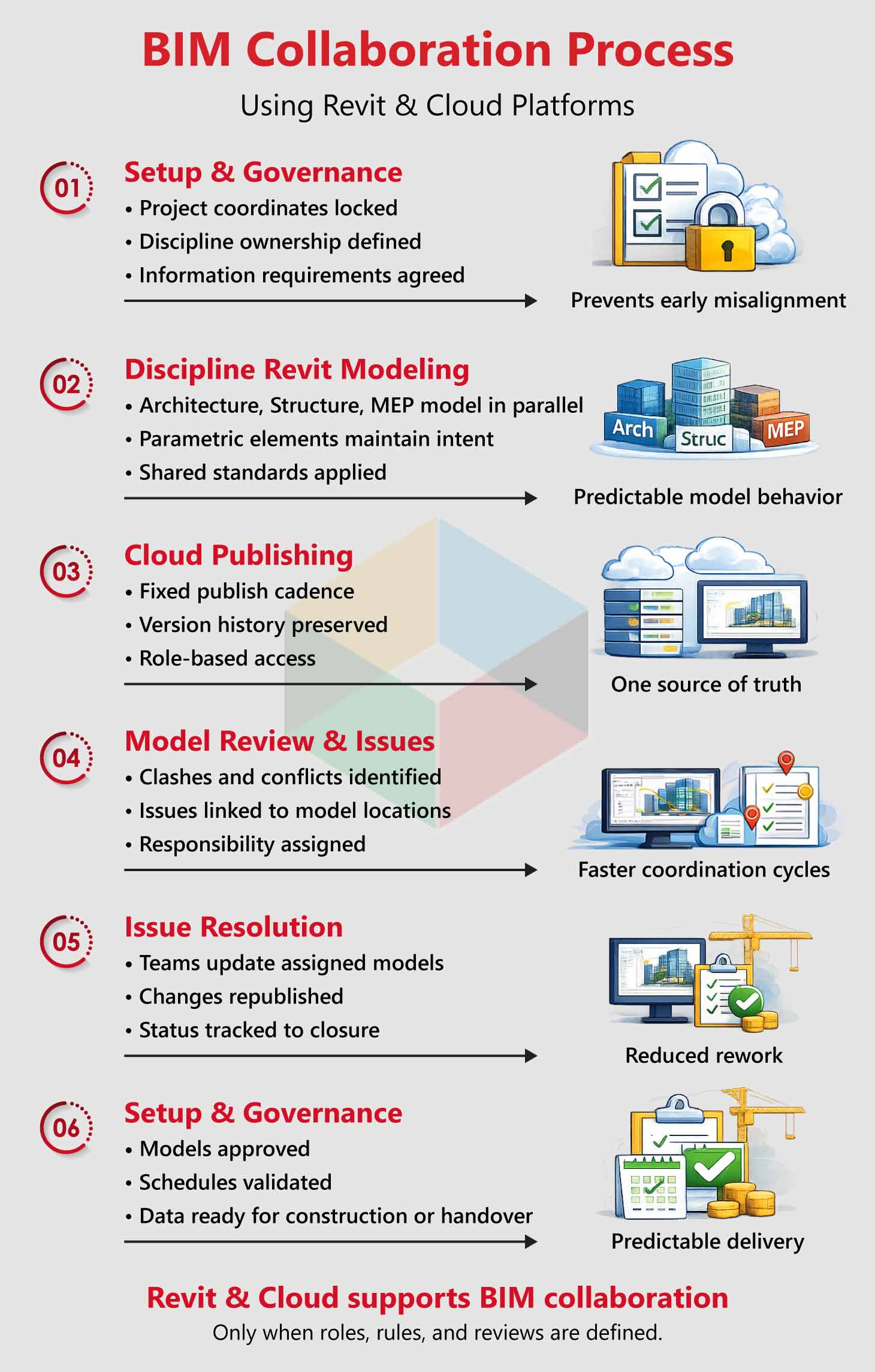
Revit-based collaboration looks very different once teams move off shared drives and into cloud environments. On multi-consultant projects, the biggest shift isn’t speed — it’s visibility. Everyone sees the same published model, the same issues, and the same decisions, without relying on email chains to fill the gaps.
Clear Access to Current Models Reduces Confusion
Working in the cloud removes the guesswork around which model is current. Teams reference published versions rather than personal copies, and version history makes changes easier to track. This becomes critical when architecture, structure, and MEP BIM Modeling teams are all updating in parallel.
Coordination Issues Stay Tied to The Model
Instead of problems bouncing between inboxes, cloud platforms anchor issues directly to model locations. The data, like screenshots, comments, and assigned responsibilities, is kept included in the issue until it is resolved. This helps keep coordination meetings focused and avoids repeating the same problems.
Distributed Teams Coordinate with Less Friction
For firms working in multiple offices or time zones, cloud workflows reduce reliance on file transfers and manual syncing. Teams update models during their working hours. Publish them when ready, and move the project forward without waiting for handoffs.
Cloud collaboration doesn’t remove coordination effort. It makes it harder to hide where things stand. That transparency is the real advantage.
Limitations of Revit BIM Collaboration
Cloud platforms don’t fix unclear scopes, poor modeling discipline, or irregular publishing habits. They expose those weaknesses faster. Without defined responsibilities and review cycles, collaboration noise increases instead of decreasing.
Used with structure, Revit and cloud platforms support disciplined BIM collaboration. Used casually, they simply move coordination problems online.
Limitations of Revit in BIM Projects
Revit brings building architecture to BIM delivery, but it has limits that need to be addressed. Ignoring these limitations may lead to frustration, not better outcomes.
Interoperability Constraints
Revit is a proprietary platform. Open exchange relies on IFC, defined by buildingSMART. IFC supports model exchange, data loss and translation issues still occur, especially on mixed-software projects. Validation and agreed exchange rules are essential.
Performance depends on model discipline
Large, heavily detailed models slow down quickly. Without model segmentation, cleanup routines, and hardware planning, productivity drops as team size grows.
Skill levels affect output quality
Two teams using the same Revit setup can produce very different results. Training, audits, and mentoring are required to maintain consistency at scale.
The software cannot define information requirements, assign responsibility, or resolve unclear scopes. Without governance, Revit amplifies existing workflow problems instead of fixing them.
Best Practices for Using Revit in BIM
| Best Practice Area | What to Do in Revit | Why It Matters in BIM Delivery |
|---|---|---|
| BIM goals & scope | Define information requirements and model uses before modeling starts | Prevents over-modeling and misaligned expectations |
| Project setup | Lock levels, grids, and coordinates early | Avoids cascading coordination resets |
| Model ownership | Separate models by discipline with clear responsibility | Improves accountability and issue resolution |
| Templates & standards | Use tested templates, view controls, and naming rules | Maintains consistency across teams and projects |
| Family management | Limit families to required detail and parameters | Reduces performance issues and bad data |
| Worksharing rules | Assign Worksets and permissions deliberately | Prevents overwrite conflicts and rework |
| Publishing discipline | Set and follow a fixed publish cadence | Keeps coordination predictable |
| Model reviews | Run regular audits for warnings, unused elements, and data gaps | Catches issues before they compound |
| Schedule usage | Treat schedules as live design checks, not final outputs | Improves quantity reliability |
| Change management | Document and review model changes continuously | Reduces late-stage documentation cleanup |
| Training & support | Train project leads, not just production staff | Ensures standards are applied correctly |
| Automation use | Apply scripts for repetitive tasks and audits | Saves time without increasing complexity |
Future of BIM and Revit Technology
BIM maturity is shifting toward data reliability and automation. Geometry is table stakes.
Revit will remain the center of BIM Revit software ecosystems. But success will depend on how well firms integrate standards, automation, and interoperability.
Tools evolve. Process discipline remains the differentiator.
Conclusion
The debate around BIM vs Revit misses the point when framed as a tool comparison.
Building Information Modeling vs Revit is about intent versus execution. Revit supports BIM when information is planned, governed, and reviewed. Without that structure, it becomes an expensive modeling tool.
If your organization wants reliable coordination, predictable delivery, and usable handover data, the focus should be on BIM first and Revit for Architecture as a means, not the goal.
At Virtual Building Studio, we support AEC teams with Revit MEP BIM modeling, and BIM Coordination Services aligned with Revit workflows with real BIM outcomes. Not theory, not templates that remain unused.
If you are ready to move beyond using Revit and start working in BIM, that’s where the conversation gets practical.